Eclipse sensiNact Resource Selectors
A resource selector is a simple type of filter designed to easily select a sensinact provider and its resources. It uses simple key/value statements and is easily represented in JSON or other serializations.
/* Resource Selector */
{
  "providers": [
    /* One or more Provider Selection entries */
  ],
  "resources": [
    /* One or more Resource Selection entries
       Note that these entries must not contain any "value" selections
    */
  ]
}

/* Provider Selection */
{
  "modelUri": { /* Selection */ },
  "model": { /* Selection */ },
  "provider": { /* Selection */ },
  "location": { /* Location Selection */ },
  "resources": [
    /* One or more Resource Selection entries */
  ]
}

/* Resource Selection */
{
  "service": { /* Selection */ },
  "resource": { /* Selection */ },
  "value": [
    /* One or more Value Selection entries */
  ]
}

/* Selection */
{
  "value": "some value", /* Always a String */
  "type": "EXACT", /* One of EXACT, REGEX, or REGEX_REGION */
  "negate": false /* whether this is a negative test */
}

/* Value Selection */
{
  "value": "some value", /* Always a String */
  "operation": "EQUALS", /* One of EQUALS, LESS_THAN, GREATER_THAN, LESS_THAN_OR_EQUAL,
                            GREATER_THAN_OR_EQUAL, REGEX, REGEX_REGION, IS_SET, IS_NOT_NULL */
  "negate": false, /* whether this is a negative test */
  "checkType": "VALUE" /* One of VALUE, SIZE or TIMESTAMP */
}
Creating a Filter from a Resource Selector
A filter can easily be created from a Resource Selector using the ResourceSelectorFilterFactory service. This service can take a single Resource Selector and turn it into an ICriterion, or combine many Resource Selectors into a single ICriterion using an OR semantic.
The ResourceSelectorFilterFactory service also integrates with the sensiNact Filter parser runtime, allowing JSON serialized resource selectors to be handled natively. The filter name used for this parser is resource.selector
Resource Selections
Resource Selections provide the ability to identify a resource that should be returned, and optionally to restrict the set of returned providers based on the value of the resource. The service and resource properties are used to select the resource(s) that should be included with the selected provider, while the value property defines zero or more Value Selections that can be used to exclude providers from the set selected by the Resource Selector.
In general it is best to have a one to one mapping between resource selections and selected resources, however this is not required, and if a Resource Selection matches multiple resources in a provider then they will all be selected.
Provider Selections
The providers property of a Resource Selector contains one or more Provider Selections which determine the providers that will be selected. If multiple selections are provided then these are combined using an OR semantic. Each provider selection may restrict the modelUri, model, provider, and location of the provider, as well as defining zero or more Resource Selections to identify the resources that should be used to further filter the provider list, and then returned for each selected provider.
Additional Resources
The resources property of a Resource Selector contains zero or more Resource Selections which are used to define additional resources that should be included in any selected providers. These do not form part of any filtering, and so must not contain any Value Selections, and are purely additive when selecting data to return for already selected providers.
Selections
A selection is the simplest part of a resource selector, and applies to the modelUri, model, provider, service and resource properties. Each of these properties corresponds to a component of the full name of the resource, for example the provider name or the service name.
{
  "type": "EXACT",
  "value": "foobar"
}
Selections must always have a value property, which is the value to be tested against. The type of test is determined by the type property, which is one of:
EXACT- the selection value must exactly match the name componentREGEX- the selection value is used as a regular expression which must must match the entire name componentREGEX_REGION- the selection value is used as a regular expression which must match some part of the name component.
If the type property is not specified then it has the value EXACT.
Simple selections
If you want to declare a simple EXACT match then you can do this by using the value string directly, with no enclosing object.
/* Resource Selection for admin/friendlyName */
{
  "service": "admin",
  "resource": "friendlyName"
}
Wildcard selections
If there should be no restriction on the name component then it should be omitted, or set to null. For example the following:
{
  "model": { "value": "foo", "type": "EXACT" },
  "provider": null,
  "service": { "value": "bar", "type": "EXACT" },
  "resource": { "value": "foobar", "type": "EXACT" }
}
selects all the foobar resource in the bar service for all providers that use the foo model.
Negation
Selections can be negated using the property negate which is a boolean. If omitted then the value is false. If the value is true then the selection rule is negated, meaning that only name components which fail the test are selected.
Optimising filters
In general it is best to use EXACT matches which have "negate": false when listening for data updates. This allows sensiNact to minimise the number of events that have to be tested and discarded.
Multiple Selections
Each selection is a single object, and does not support multiple selections. If you need to select multiple resources then this is best achieved using multiple resource selections.
Simple Example
The following example shows how a resource selector can be used to gather information from multiple providers. In this example there are two different models:
TempSensor- a temperature sensor which has atemperature/readingresourceWindSensor- a wind speed sensor which haswind/speedandwind/directionresources
The following selector will gather the name, location and readings from all of the sensors which have names starting with public.
{
  "providers": [
    {
      "model": "TempSensor",
      "provider": { "value": "public.+", "type": "REGEX" },
      "resources": {
        "service": "temperature",
        "resource": "reading"
      }
    },
    {
      "model": "WindSensor",
      "provider": { "value": "public.+", "type": "REGEX" },
      "resources": [
        {
          "service": "wind",
          "resource": "speed"
        },
        {
          "service": "wind",
          "resource": "direction"
        }
      ]
    }
  ],
  "resources": [
    {
      "service": "admin",
      "resource": "friendlyName"
    },
    {
      "service": "admin",
      "resource": "location"
    },
  ]
}
Value Selections
Value Selections are filters which are applied to the value of any and all resources which match the Selections that they are attached to.
Value Selections have the following form:
{
  "value": "17",
  "operation": "GREATER_THAN",
  "negate": false,
  "check": "VALUE",
  "mode": "ANY_MATCH"
}
value: the value(s) to test. This can be a single value or a list of values. The test behaviour depends on the selection modeoperation(default:EQUALS): the operation to compare a resource value with a test valuenegate(default:false): the filter is the negation of the selectioncheck(default:VALUE): which part of the resource must be checked
Relying on default value, the simple form of the same value selection can be:
{
  "value": "17",
  "operation": "GREATER_THAN"
}
Each Resource Selection may define multiple Value Selections. These are combined using an AND semantic, therefore all must be satisfied simultaneously. If an OR semantic is required then multiple Provider Selections should be used.
Operation Types
The operation of a value selection is one of:
EQUALS(default),LESS_THAN,GREATER_THAN,LESS_THAN_OR_EQUAL,GREATER_THAN_OR_EQUALMathematical operators are applied by converting
valueinto the same type as the resource value being tested, and then either usingequalsor by treating the resource value as beingComparable.If the resource value is not
Comparablethen the operation returnsfalse.
REGEXandREGEX_REGIONBehave as described for Selections.
IS_SETA special operator which returns true if the resource has been set to a value.
Note that the value may be
null.
IS_NOT_NULLA special operator which returns true if the resource has been set to a non-null value.
Check Type
The check type of a value selection indicates what should be tested in the resource:
VALUE(default): the test will be applied against the resource value.SIZE: the test will be applied against the size of the resource value. For arrays, collections and maps, this is the number of elements. For strings, this is the length of the string. For numbers, it is the absolute magnitude of the number.TIMESTAMP: the test will be applied against the timestamp of the resource value. The test value must be an ISO-8601 datetime string.AGE: the test will be applied against the age of the resource value, i.e. the difference between the resource timestamp and the test execution time. The selection value must be an ISO-8601 duration string, e.g.PT4h30M.AGE_SorAGE_MS: the test will be applied against the age of the resource value, i.e. the difference between the resource timestamp and the test execution time. The selection value must be a number of seconds (AGE_S) or milliseconds (AGE_MS).
Value Selection Mode
The mode of a value selection indicates how the test must be done when multiple test values are given and/or the tested resource value is a list.
The mode can be one of:
EXACT_MATCH: the value of the resource must exactly match the value of the selection, including ordering when multiple values are presentANY_MATCH(default): at least one of the resource value(s) must match any of the given selection value(s). This implies that the resource value must be set.ALL_MATCH: all of the resource value(s) must have a match in the selection. Order doesn’t matter. The selection size may be different from the number of resource values.SUPER_SET: all of the selection value(s) must be match by the resource value(s), but there may be one or more resource values which do not match.
Examples
To demonstrate the value selection mode, we’ll consider the following resources:
answer=42pool-1=[1, 2, 3]pool-2=[2, 10, 42]
We will consider a value selection with check type VALUE and operation EQUALS.
Here is the resulting match matrix from different selection values and mode.
Selection Value |
|
|
|
|
|---|---|---|---|---|
|
|
|
|
|
|
|
|
|
|
|
No match |
|
No match |
|
|
No match |
|
|
No match ( |
Simple Value Selections
If you want to declare a simple EQUALS match then you can do this by using the value string directly, with no enclosing object.
/* Resource Selection for admin/friendlyName */
{
  "service": "admin",
  "resource": "friendlyName",
  "value": "sample"
}
Value Selections Combination
Value selections may be provided singly, or in an array:
{
  "model": {
    "value": "testModel"
  },
  "resources": {
    "service": {
      "value": "testService"
    },
    "resource": {
      "value": "testResource"
    },
    "value": {
      "value": "17",
      "operation": "EQUALS"
    }
  }
}
or
{
  "model": {
    "value": "testModel"
  },
  "resources": {
    "service": {
      "value": "testService"
    },
    "resource": {
      "value": "testResource"
    },
    "value": [
      {
        "value": "5",
        "operation": "GREATER_THAN"
      },
      {
        "value": "17",
        "operation": "LESS_THAN"
      }
    ]
  }
}
Where more than one value is supplied the filters are combined using a logical AND semantic, meaning that the above Resource Selector selects the resource testResource from the service testService for all providers using the model testModel, restricted to only those resources with values between 5 and 17 (exclusive).
Negation
Value Selections can be negated using the property negate which is a boolean. If omitted then the value is false. If the value is true then the selection rule is negated, meaning that only name components which fail the test are selected.
Location Selections
Location Selections are used to limit the geographic area within which a Resource Selector operates:
{
  "value": {  /* A GeoJSON Object */ },
  "radius": 100.0,
  "type": "CONTAINS"
}
Unlike Value Selections the Resource Selector does not need to select the location resource from the admin service in order to filter its value.
Operation Types
The value property of the Location Selection is a GeoJSON object representing the area to be tested against. As with value selections the value represents the right hand side of the operation.
The operation of a value selection is one of:
CONTAINS- The location of the provider is fully contains the region defined by this Location Selection. This is commonly used for identifying providers that cover a particular location, e.g. which cameras can view the supplied point.WITHIN- The location of the provider is fully contained within the region defined by this Location Selection. This is commonly used for geo-fencing, e.g. finding all providers inside a given area.INTERSECTS- The location of the provider is at least partially contained within the region defined by this Location selection. This is commonly used for geo-fencing, e.g. finding all providers that relate to a given area.DISJOINT- The location of the provider is totally separate from the region defined by this Location Selection.
There is no default value for the operation property and it must be specified.
CONTAINS and WITHIN
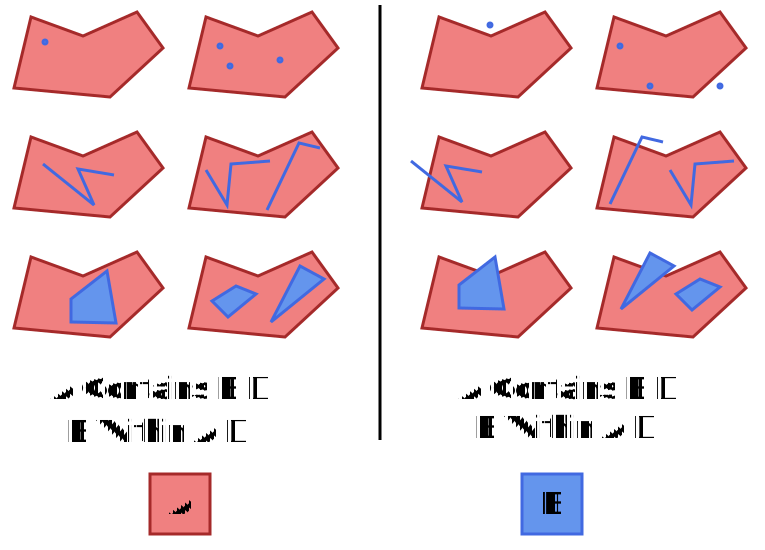
The CONTAINS and WITHIN operators form a logical pair. Specifically that if A CONTAINS B is true then by definition B WITHIN A is also true. Both CONTAINS and WITHIN are not commutative.
The following diagrams outline how CONTAINS and WITHIN work with various GeoJSON types, such as MultiPoint and LineString
INTERSECTS and DISJOINT
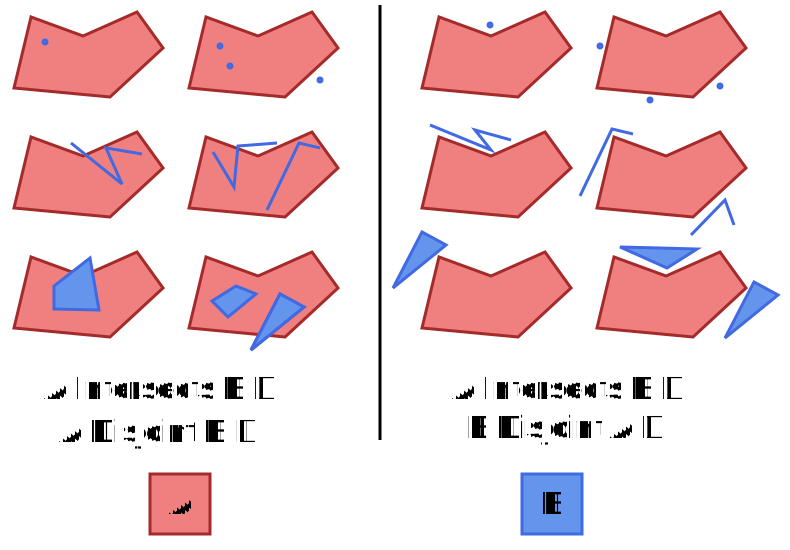
The INTERSECTS and DISJOINT operators form a logical pair, specifically that they are the logical inverse of one another. If A INTERSECTS B is true then A DISJOINT B must be false and vice versa. Both INTERSECTS and DISJOINT are commutative.
The following diagrams outline how INTERSECTS and DISJOINT work with various GeoJSON types, such as MultiPoint and LineString
Radius
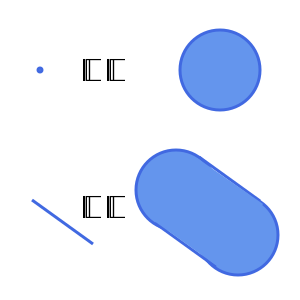
The radius property of a location selection is a number representing the tolerance, in meters, with which the test should be applied. This means that if value is a GeoJSON Point then the radius defines a circle around that point on the earth’s surface. If value is a GeoJSON LineString then the radius defines a polygon where all points are radius away from the line.
For example:
Note that to reduce complexity radius calculations are not made using geodesics, and so are prone to distortion at high latitudes. The further from the equator that you travel the more distorted the radius will become, particularly along an East/West axis. If high accuracy is important to your use case then we recommend performing your own geodesic buffering and then submitting the resulting polygon as the value of your Location Selection.
Location Selections Combination
Combining Location Selections behave in the same way as Combining Value Selections using an AND semantic when combining the tests.
Advanced Location Selection Rules
The following section can be ignored by most users, and is only relevant for those with an interest in Geometry and Geodesy, or those with particularly complex filtering needs.
Complex Geometries
When either the provider’s location or the Location Selection value is a Feature, GeometryCollection or FeatureCollection then it is possible for multiple different GeoJSON object types to apply simultaneously. In this situation the gateway must combine the locations into a single object for filtering. It is not possible for this single object to contain locations of different dimensionality (Point has zero dimensions and Polygon has two) therefore in this case all of the elements are transformed into two dimensions before being combined.
Essentially this means that the Point objects become very small circles and LineString objects become very thin polygons (approx 1mm at the equator, less than 1 metre within 5 km of the poles). This is unlikely to have any effect on the results that you see, but if it does then you should attempt to avoid using multi-dimensional geometries for your locations and location selections.
Differences between Location Selections and Formal Geometry
The Location selections in sensiNact use simplified forms of the formal mathematical operators defining geometric relationships. This is to reduce the complexity of filters and to make them easier to understand.
In all cases sensiNact treats the boundary (edge) of a GeoJSON object as being part of the interior of the object.
As boundaries are not separate from the interior sensiNact does not require a boundary to be crossed for two objects to intersect. They need only share at least one point in their interiors.
These rules mean that in the examples below the Point and LineString are contained within the Polygon, and they intersect with it.
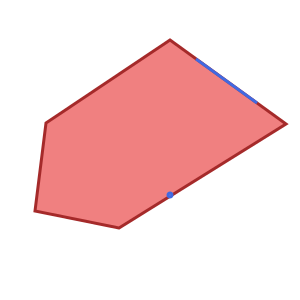
In a formal sense CONTAINS, WITHIN and INTERSECTS should operate slightly differently. This is because in formal geometry the boundary of a shape or surface is distinct from the interior and exterior. Therefore in a formal sense the following examples are not contained because they are on the boundary. They also do not intersect because they do not cross the boundary.
This formal definition can lead to some surprising results, for example if you collect all the items that intersect, and all the items that are disjoint, then you may still not have all items accounted for. Rather than having this difficult behaviour sensiNact opts for the simpler rules outlined above.
Compact Resource Selectors
Where only a single resource is required a compact resource selector can be used as a shorthand:
{
  "model": { /* Selection */ },
  "provider": { /* Selection */ },
  "service": { /* Selection */ },
  "resource": { /* Selection */ },
  "value": { /* Value Selection */ },
  "location": { /* Location Selection */ }
}